This intro and following guide are designed to help you play through the 1 to ee2000 section of the game. This introduction will give you some fundamentals to help you progress while playing this section of the game.
If you don’t want to have spoilers for the later game, don’t read
further ahead than you are already.
Variables are the main purchases in the game. They will be the most important to buy, and you should buy them as priority because they increase Lifetime f(t) faster. All of the variables purchasable are below. You will not be able to get all of them right away but will be able to get them all as you keep playing. This screen is found by pressing the <Upgrades> button between the upgrades and the main equation graph.
Upgrades are where additional boosts to variables lie. They are crucial to progress and should be bought often. You will be able to see items that can be purchased with f(t), , and on that page in that order. You can navigate to that tab by pressing the <Variables> button between the variables and the main equation graph.
You start out with normal numbers and quickly work your way up to notation. This notation is scientific notation. It stands for . Later you are introduced to . This is a custom game notation that stands for .
Achievements are just that. They are goals to reach that give you stars as reward.
Minigames are puzzles that you can solve that will give you stars as a reward for solving them. Check out the Minigame Guide for how to solve each puzzle and more resources.
Stars are a currency that operates outside of the main game that you use to purchase star upgrades. These upgrades range from QoL (Quality of Life) features to boosts to the gameplay. For the most part, you should prioritize new variables as soon as you can, EXCEPT for Autoprestige. Autoprestige is a huge boost in progress due to impossible to replicate levels of optimization, and you should prioritize it over variables of a similar cost. More details on star upgrades to prioritize can be found in following guides.
If you enter the autoprestige or autosupremacy field to enter the expression, you will most often notice it evaluate as False and sometimes as True. When the evaluation becomes True, the expression will cause a prestige/supremacy respectively. Any other time when the expression is evaluated, it will evaluate as False. If the expression is evaluating to False, there is no bug, nor is it broken. It is doing exactly what it is meant to do.
When the expression is evaluated as “Cannot Evaluate”, this means is too small. This is intended game design and can be ignored.
NOTE: Entering the expression field where it displays the evaluation breaks smooth() locking which will break all any expression using said technique.
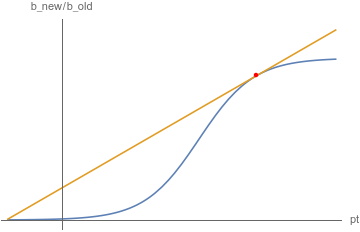
The idea behind is clearer if you consider a different term . They measure the same thing, but the second one is just raised to the exponent, base e. They are equivalent because (and ) are both strictly increasing functions on the domain , so applying those functions will not change where the local maximum is located (when changes sign).
is better explained with . is the new value you would get after prestige, and is the old value you currently have. If you prestige, your is multiplied by that exact value. That is, your grows with ratio if you were to prestige.
The general idea of a good expression would be to “maximize growth over time,” and it would be the same as “maximize growth over time.” To measure growth over time, in this approach we take the growth of that can result from current prestige only and take as the ratio of growth.
We could divide the ratio by time, but that doesn’t make sense because ratios are applied multiplicatively (e.g. ratio per second means in seconds, not ). Hence, instead of dividing, we take the power ( being the time since prestige) to get the correct value of ratio.
Therefore, we get the expression which represents “after last prestige, grew by per second.” To maximize this value, we note that this value actually achieves one local maximum (by working through the behaviors of ( over time) so we may simply take a derivative () and see when it turns negative.
Do a manual supremacy when you input this expression and never enter the edit expression field again afterwards. Make sure autobuyers are on x1 or xMax.
The autosupremacy expression is an attempt to do the autoprestige expression, but for supremacy. It tracks the same information, but over multiple prestiges. It is harder to make an autosupremacy expression than an autoprestige expression because after a new prestige, Supremacy doesn’t increase until you get back to the you left off at. This makes the growth of a supremacy staircase-shaped. This makes it difficult to find the optimal point as we did with autoprestige and is why we time it with the end of a prestige to be sure.
If a value fluctuates too much, you can use smooth so that the value does not go rampant, triggering some conditions incorrectly. One main example is to use it when you use multiple functions on the same expression.
For instance, will behave much better than the simple because using d multiple times creates a lot of fluctuation, due to the discrete nature of (not a true derivative, but an extrapolation of slope over the last tick). Of course, this introduces some “lag factor” in the sense that when some threshold is passed, smooth won’t display it until a short after.
Due to the nature of the expression, if the second input of smooth is very large, then there will be no average at all: instead of taking a normal average, we can skew the weights so that any new value is too small to be noticed. As a very simple example, we can calculate averages like to preserve old values. On the contrary, if we skew this the other way, then only the new value would appear: .
A simple expression like will first compute expr and keep that value indefinitely until the expression field is reset: upon modifying the expression, every prestige for prestige expressions, and every supremacy for supremacy expressions. This is what we refer to as “lock.”
However, we can do better: instead of simply locking values, we can control when the locking mechanism comes in. Using conditions, we can switch back and forth between indefinite locks and instantaneous updates: . If cond is true, then will be ee99, thereby activating the lock. If cond is false, then will be 0, thereby switching to instantaneous updates. The result is that we obtain the value of expr evaluated when the cond was last false.
If we have two really large values, the average of the two will be in favor of the larger of the two. In fact, if the two numbers are really really big, the average will be indistinguishable from the larger of the two due to finite data storage (term: floating point precision). We can abuse this idea to convert the input of smooth into a very large value, thereby converting averages like into the equivalent . The effect is that we obtain the maximum value that the input attained ever since the expression was reset (from modifying the expression or from prestige (resp. supremacy) for prestige expression (resp. supremacy expression)). Of course, we have to cancel out the magnification of the inputs in order to retrieve the value we actually want.
For example, has the input large enough that it displays the largest value of that occurred so far. However, we wouldn’t want db blown up this way, so we can use to retrieve back the maximum .